29 Apr 2026
Moving to Google Cloud: Balancing Infrastructure Costs and Developer Productivity
 Reviewed byAzjargal Gankhuyag· AI Agent Engineer | Solution Architect
A framework for engineering leadership to migrate workloads to Google Cloud without spiking infrastructure bills or disrupting developer experience.
Framing the Migration Challenge

Migrating infrastructure to Google Cloud presents a dual threat to engineering leadership: it can easily inflate your monthly cloud bill, and it can destroy developer productivity. When an organization moves workloads from on-premise environments or another cloud provider, the focus naturally drifts toward infrastructure compatibility, networking, and security. What often gets left behind is the Developer Experience (DX).
DX expense is not just tooling costs; it is the hidden friction introduced when engineers must learn new deployment models, navigate unfamiliar Identity and Access Management (IAM) structures, or write custom glue code to make legacy CI/CD pipelines work in a new environment. If developers spend their days fighting cloud permissions instead of shipping features, the migration has failed, regardless of what the infrastructure bill says.
A successful migration requires a strategy that keeps both infrastructure costs and DX expenses flat, or ideally, reduces them. This piece explores how to design a Google Cloud migration that protects your budget and your engineering velocity. It covers architectural models, cost-control mechanisms, and the decisions technical leaders must make to prevent a raw "lift and shift" from becoming an expensive operational burden.
Core Mechanics of a Cost-Neutral Migration

Maintaining cost parity during a migration requires strict baseline measurement and a phased transition. You cannot optimize what you do not measure.
Before moving a single workload, establish the baseline cost of your current compute, storage, and networking. Alongside this, establish your DX baseline: how long does it take for a developer to push code from their local machine to production? What is your deployment frequency? If these metrics degrade during or after the migration, your DX expense is rising.
The core mechanic of migrating without disrupting developer workflows is abstraction. If your developers are already deploying containers, the transition to Google Cloud should ideally be invisible to them. By standardizing on containerization (Docker/OCI) and Infrastructure as Code (Terraform) before the move, you decouple the application code from the underlying cloud provider.
During the migration, you run a dual-stack environment. Traffic is routed using DNS or a global load balancer, shifting a small percentage of requests to Google Cloud while the majority remains on the legacy infrastructure. Clear ownership is vital here. Cost control relies on rapid validation. The longer the dual-run phase lasts, the higher the infrastructure expense. Teams must have a strict timeline for tearing down the legacy infrastructure once the Google Cloud environment is validated.
Operating Models and Architectural Patterns
Google Cloud offers distinct compute models. Choosing the right one dictates both your infrastructure bill and your DX overhead.
1. Lift and Shift: Compute Engine (IaaS)
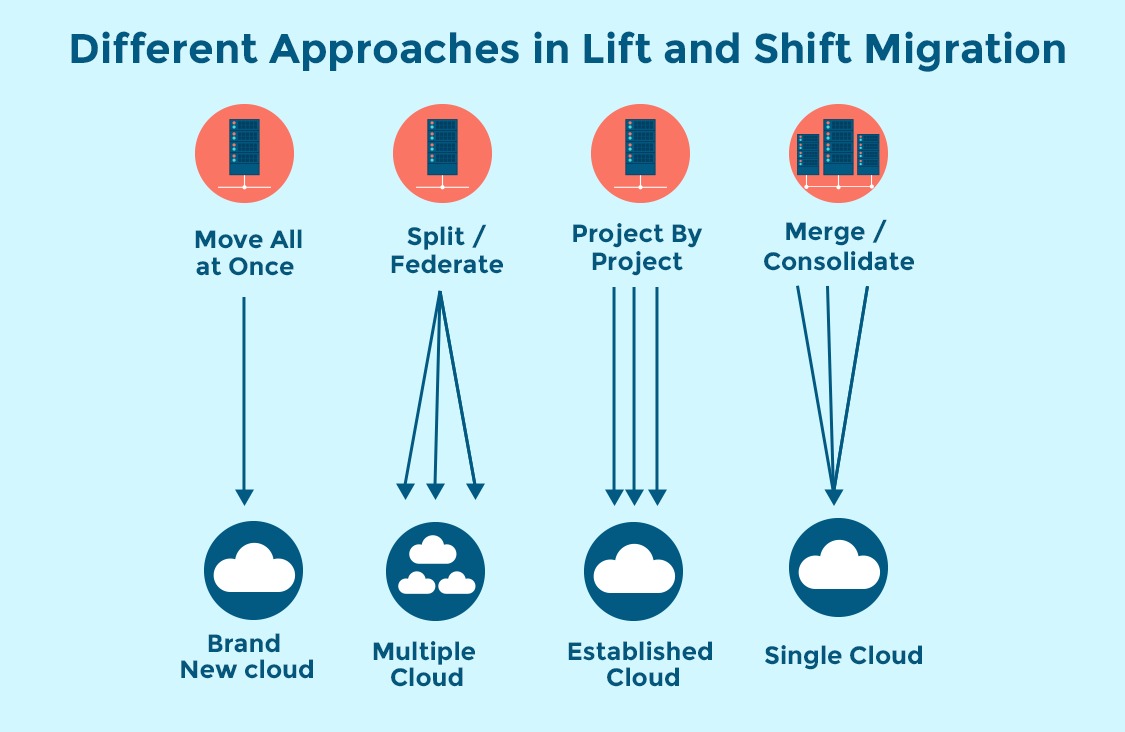
Moving virtual machines directly to Google Compute Engine (GCE) is the fastest way to migrate, but it rarely yields cost savings or DX improvements. You carry over your existing technical debt, operating system maintenance, and patching overhead.
- When to use: Only for legacy workloads that cannot be containerized, or when facing a hard data center exit deadline where speed trumps optimization.
- DX Impact: High maintenance. Developers or operations teams must continue managing OS-level configurations, reducing time spent on product delivery.
2. Managed Containers: Cloud Run (Serverless)
Cloud Run is Google Cloud's fully managed compute platform for deploying containerized applications. It automatically scales to zero, meaning you only pay for the exact compute time your code uses.
- When to use: Web services, APIs, and event-driven workloads.
- DX Impact: Excellent. Developers provide a container image, and Cloud Run handles the provisioning, routing, and scaling. It dramatically reduces the operational burden on engineering teams, keeping DX expenses near zero. See the Cloud Run architecture framework for implementation baselines.
3. Orchestrated Containers: Google Kubernetes Engine (GKE)
GKE is the industry standard for managed Kubernetes. It offers deep control over networking, security, and workload scheduling.
- When to use: Complex microservice architectures, workloads requiring specific hardware (GPUs), or applications that need fine-grained control over network policies.
- DX Impact: Can be heavy. Kubernetes introduces complexity. To maintain developer velocity, platform teams should strongly consider GKE Autopilot, which manages the underlying node infrastructure, allowing developers to focus purely on deploying pods rather than managing cluster capacity.
Evaluating the Fit: Workload Scenarios

Matching workloads to the right Google Cloud primitive is how you control costs while preserving developer momentum.
- Stateless Web Applications: Applications that do not store session data locally are prime candidates for Cloud Run. Because Cloud Run scales based on traffic, environments with variable demand (like staging, QA, or internal tools) cost almost nothing when not in use, generating immediate measured improvement in cloud spend.
- Heavy Data Processing: If your on-premise environment struggles with batch processing, lifting and shifting Hadoop clusters to Compute Engine is a missed opportunity. Refactoring these pipelines into managed services like BigQuery or Dataflow shifts the cost from fixed, always-on infrastructure to a pay-per-query model. This removes the burden of cluster management from your data engineering teams.
- Stateful Legacy Systems: Databases and applications requiring persistent local storage are the hardest to migrate. Refactoring these to use managed database services like Cloud SQL, AlloyDB, or Cloud Spanner usually provides the best long-term cost predictability and operational stability. It requires upfront engineering investment but pays dividends in continuous improvement.
Trade-offs, Constraints, and Risks
Moving to Google Cloud introduces specific trade-offs that can catch technical leadership off guard if not validated early.
Network Egress Costs
Cloud providers charge for data leaving their network. If you migrate your compute layer to Google Cloud but leave your database on AWS or on-premise during a prolonged transition, the cross-network traffic will result in massive egress fees. Constraint check: Group tightly coupled services and migrate them together in defined waves to minimize cross-boundary traffic.
Identity and Access Management (IAM)
Google Cloud's IAM model is project-centric, whereas environments like AWS are largely account-centric. Attempting to replicate legacy IAM roles one-to-one in Google Cloud leads to complex, unmanageable permissions. This degrades DX heavily, as developers constantly face authorization blockers. Constraint check: Redesign your IAM strategy around Google Cloud's resource hierarchy (Organization > Folder > Project). Use service accounts strictly for workload identity, and use Groups for human access.
The "Always On" Trap
If you migrate a development environment of 50 VMs to Compute Engine and leave them running 24/7, your costs will spike. Google Cloud offers Sustained Use Discounts, but true cost control requires implementing automation to shut down non-production environments off-hours, or moving those workloads to a serverless model where they natively scale to zero.
Concrete Decision Criteria
When mapping legacy infrastructure to Google Cloud, use these criteria to protect both your budget and your team's sanity. Evaluate your application portfolio against this matrix:
- Deployment Speed: If your current CI/CD pipeline deploys in 10 minutes, the Google Cloud target must be 10 minutes or less. Do not sacrifice deployment speed for architectural purity.
- Infrastructure Provisioning: Require all new Google Cloud resources to be provisioned via Terraform or Pulumi. Manual clickOps in the console destroys repeatability and inflates DX expense when debugging environments later.
- Workload Mapping Guide:
- AWS EC2 / On-Prem VM -> Google Compute Engine (Avoid if possible; use for legacy only)
- AWS ECS / Simple Containers -> Google Cloud Run (Preferred for cost and DX)
- AWS EKS / Complex Orchestration -> GKE (Use Autopilot to lower operational overhead)
- AWS RDS -> Cloud SQL / AlloyDB
- AWS S3 -> Google Cloud Storage
Common Pitfalls in GCP Migrations
Serious engineering teams anticipate failure points. Here is where migrations typically fail to meet cost and DX goals.
Ignoring the developer's local environment If production runs on GKE but developers test locally on bare metal or entirely different setups, the deployment gap will cause immense friction. Ensure local development mimics the cloud by utilizing tools like Skaffold, Minikube, or standardizing on Docker Compose. If developers cannot easily test their code locally before pushing to Google Cloud, DX expense skyrockets.
Over-engineering Kubernetes Adopting Kubernetes simply because you are moving to the cloud is a costly mistake. If a workload can run reliably on Cloud Run, put it there. Forcing small, stateless APIs into GKE increases your infrastructure bill (paying for cluster management and idle nodes) and your DX bill (forcing developers to maintain complex Helm charts and Kubernetes manifests).
Failing to rightsize before migrating On-premise servers are typically over-provisioned to handle peak loads. If you lift and shift a VM with 64GB of RAM that historically only uses 8GB, you will pay for 64GB in Google Cloud. Analyze actual CPU and memory utilization over a 30-day period before migrating. Provision cloud resources based on average usage, relying on cloud-native auto-scaling to handle peak traffic.
Lacking clear ownership of FinOps Cloud costs run away when developers can spin up infrastructure without visibility into the associated costs. Establish FinOps practices early. Implement tagging/labeling on all Google Cloud resources so billing exports can be mapped directly to specific engineering teams or products. Accountability drives efficiency.
Practical Takeaways
- Standardize on containers and Infrastructure as Code before beginning the migration to abstract the underlying cloud specifics from your developers.
- Default to serverless architectures like Cloud Run for stateless workloads. This minimizes both baseline compute costs and operational overhead.
- Redesign, do not directly translate, your IAM policies to fit Google Cloud's project-based resource hierarchy to prevent access friction.
- Group highly conversational services together during migration waves to avoid severe network egress penalties.
- Measure deployment frequency and lead time for changes before and after the move; if these metrics degrade, developer experience is suffering.
- Lean heavily on managed services (Cloud SQL, GKE Autopilot, Pub/Sub) to shift operational burden from your internal teams directly to Google Cloud.
Join the newsletter
Enjoyed this article? Get more like it in your inbox every week.
* 200+ tech professionals already in.
Next read
28 Jul 2026
5 Architectural Strategies to Unlock AI’s Full Potential
Move beyond prototype LLMs. Discover five architectural strategies to build reliable, grounded, and measurable AI systems that deliver real business value for the enterprise.
20 Jul 2026
Engineering an Agentic Workforce: Using Google Workspace
Examine how enterprises use Google Workspace and Vertex AI to shift from basic generative chat to secure, multi-step agentic workflows that drive measurable improvement.
13 Jul 2026
Responsible and Explainable AI: A Practical Guide for Engineering Leaders
Move beyond compliance. Learn how to architect AI systems that balance model performance with transparency, safety, and operational governance for reliable delivery.